Looking for writing-related posts? Check out my new writing blog, www.larrykollar.com!

Thursday, February 10, 2022 No comments

Sunset over FAR Manor

 …and when I say over, I mean over.


I launched the drone, high (23m, according to the flight log) above the trees to get an unobstructed view of the mountains to the west. You can see the tree platform in the back yard at the bottom center. The light-colored horizontal strip left of center is one of the chicken houses equipment storage sheds.

We’ve been getting pretty sunsets all week, but this was the first evening I had the presence of mind to get an aerial shot. There was a little wind, enough to make it tricky bringing the drone back down, and for the second time I’ve had trouble getting a good GPS lock pre-launch. (The workaround is to turn off the GPS switch on the side of the controller, get the drone up about 20 feet/6m until it finds some satellites, and turn it back on.)

There has been plenty going on, but I’ve often had a hard time motivating myself to share it. I’ll try to do better.

Friday, December 17, 2021 No comments

If the Kludge works, use it

Kludge. Jury-rig (or the variant, jerry-rig). Lash-up. Sunshine Engineering (named for Mr. Sunshine, who bodged lots of things together that I had to straighten out later). Whatever you call it, including the racist ones nobody should have used in the first place, it’s (so the dictionary says) “an ill-assorted collection of parts assembled to fulfill a particular purpose.” Sometimes, the kludge is a necessity; a critical piece of equipment failed, deadlines are looming, and there’s no way to run to a nearby store to find what you need.

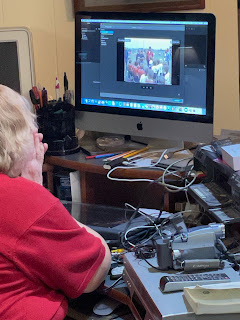
So… last week, someone called the wife. Her video business, that hasn't had any significant income in two or three years, still has a listing the in the Yellow Pages. “Can you put VHS video onto DVDs?” As she has done that before, she took the gig. Last time, we hooked a VCR into her commercial-grade DV deck and rolled tape. This time… not so much. The deck wouldn’t stay powered up, and wouldn’t open the tray (she was just passing through, but wanted the tape in there to be out so it wouldn’t interfere). She opined the deck got fried by one of the close lightning strikes we’ve had from time to time, and I couldn’t dismiss the possibility. Meanwhile, I was trying to find our cache of RCA-to-BNC adapters. We found plenty of the BNC-in/RCA-out types, but we needed the opposite. Mal-Wart dot commie carries them, but “not sold in stores.” The Mighty Zon could get us some by Thursday… it was Tuesday, and the wife was in DO SOMETHING NOW mode because she wanted to wrap this up by Friday. But with the DV deck apparently fried, there wasn’t any urgency to get the connectors anyway.

Seems to work fine for old VHS tapes
But! As the wife snarled something about taking her client’s tapes back to her, I remembered finding something else when looking for the adapters: my old Canon ZX-80 camcorder. When I say old, I mean I took footage of The Boy’s high school football games, so at least 15 years. Probably more like 17. The imager crapped out on it a long time ago, but I kept it around because I could at least play tapes into a Firewire connection, view on a tiny screen, or a bigger screen if I plugged in the included DV cable. In other words, it could do everything but take video itself. Being a tech writer, I kept the manual with the camcorder. There were lots of functions I never explored, and just in case…

Well, just in case arrived Tuesday night. I went down the table of contents, and found the vindication of my packrat ways on page 84: Converting Analog Signals to Digital Signals (Analog/Digital Converter). In this mode, you:

  • connect a VCR to the camcorder’s DV cable
  • connect a Firewire cable to the Mac
  • start capture on the Mac, play the tape, and relax
Sure, it’s a kludge, but time was tight. We have better camcorders, but I didn’t have time to find the manuals to figure out how to use them as video digitizers. Here, we hit Snag #2 (or is it #3? I lost count quickly): Final Cut Pro wasn’t capturing the video, or even seeing it. Looking at the documentation, I guessed FCP was too snooty to deal with an early-century consumer camcorder. So I tried iMovie, and iMovie told me:

(link to original)

So I guess iMovie is friendlier to the older, not so well-heeled, camcorders of the world. Since FCP has no problem importing iMovie assets, we were on the way.

Or so I thought. Snag (int(rand()*4))+3 came in this afternoon. Wife was again ranting about giving up and taking the tapes back to the client, because she couldn’t burn a DVD. I seem to remember us using Compressor to create MPEG-2 video, then using Toast to burn that, but we couldn’t remember the incantations and she wasn’t inclined to take the extra step. So I started troubleshooting. The DVD Burner app icon started bouncing, so I clicked it. “Couldn’t burn (click here for more information).” Clicking the helpful link told me what the initial “insert dual-layer disc” message should have told me in the first place: the video was too long to fit.

Solution: cut the video to 80 minutes so it fits on a DVD. Splitting video and moving it around is one of FCP’s strong suits, so the wife got to work on it.

As I type (10:30pm Friday evening), she has all the video on the system, and two or three DVDs burned. She’s behind schedule, but has a clear path to completion.

If the kludge works, use it… at least until you get a more elegant solution in hand. We’ll look into replacing the DV deck—looks like we might find something that works for around $400—and if she’s going to start back on her video work, it will pay for itself soon enough. Then, maybe, we can look at modernizing the intake end of things (i.e., the commercial-grade camcorders that are at least as old as that ZX-80). As I understand it, a lot of the newest models skip the tape drive and go directly to a SD card with some enormous amount of capacity. If that’s true, importing would mean sticking the SD card into the back of the iMac and copying the file. At that point, who needs a DV deck?

Tuesday, December 07, 2021 No comments

Computer-Aided Weeding

A couple weeks ago, I finally decided to start pulling in all the notes I’d saved up from Evernote and Google Keep into Logseq. I started with Evernote, just because.

First, I had to update the Evernote app on my iMac, so I could actually access my stuff. That should tell you how long it’s been since I actively used it.

After exporting, I used a utility called Yarle to convert the notes in each notebook to Markdown.

Now the hard part: deciding what I wanted to keep, and what to toss. The even harder part: cleaning up the sloppy mess that were most of those individual pages. There were over 400. Cleaning them up in Logseq was do-able, but slow. Lots of repeated stuff. This wasn’t a job for an outliner, it was a job for a high-powered text editor like Vim or Atom.

Unlike Vim, Atom sports a sidebar that displays all the files in the directory, and its regular expression parser recognizes newlines. So I could find blank strings using the expression ^- *\n (which means, “look for a line starting with a dash, followed by zero or more spaces, then a new line”) and get rid of them.

But the even bigger time-saver: realizing a lot of those entries were long outdated (some dated back to 2013) and deleting them. By the time I was done with that pass, I had 109 “keepers” left. From there, it was a matter of applying search and replace to fix common issues.

So with 3/4 of the pages deleted, and much of the boilerplate stuff from the remaining pages deleted as well (I just need the content, the source, and some info about the author). That means my assets folder has 4852 items in it, and most of them were no longer being linked to.

Now… am I going to make 4852 passes through my pages, by hand, to see if a pic can be deleted?

The shell (aka Terminal) is my machine gun for blasting a job like this.

# assume we're in the assets directory

mkdir -p ../assets_removed

for i in *; do

  grep -q "$i" ../pages/* || mv "$i" ../assets_removed

done

Let’s pick this apart, for those who need it.

The first line is just a comment. An important one, all the same. You need to be in your Logseq database’s assets directory for this to work correctly. BAD THINGS will happen otherwise! One of the nice things about using MacOS: if I eff something up, I can pull it out of the Time Machine backup and try again.

Next, we make a directory called assets_removed at the same level as the assets directory. Just in case we make a mistake, you know. The -p option is there to make the script shrug and move on if the directory already exists (if we’ve been here before, for example).

The third and fifth lines begin and end a loop, going through each of those >4800 graphic files.

Inside the loop, we search for the file name in the pages. The -q option is exactly what you want for a script like this; it returns success if grep finds the string and failure otherwise. The || (two vertical bars) means “execute the next part if it fails” (in this case, fails to find the file name)… and the next part moves the unused file to the assets_removed directory.

And I ended up with 255 files (out of nearly 5000) that were actually being used. The other ones are out of the way, and can be safely deleted once I verify that none of them are needed.

[UPDATE: After stepping through the pages again, I found 18 “false negatives” that had to be dragged back into the assets folder. That’s why you move them out of the way, instead of just nuking them.]

It took about a minute to grind through the assets directory, and a couple of minutes to set up the script, but that beats the heck out of hours (or days) doing it by hand! I’m fond of saying, I’m lazy enough to get the computer to do my work for me. It doesn’t always pay off this big, but it does pay off.

Off to get the Google Keep notes…

Thursday, November 18, 2021 No comments

Some updates to recent happenings

Backyard play area: I got another pair of eyebolts and hung the old bucket swing beside the nest swing. Charlie has long outgrown its previous iteration, but it’s perfect for AJ. She was a little apprehensive at first, as it’s fairly high off the ground; but once she realized there was a gate of sorts, she was all for it.

Up high is where the fun is!

Balloon: The planning commission met Tuesday to hear about the proposed tower. A lawyer for Verizon came, along with a rep from the company they’re outsourcing the tower ownership to. (I’m not sure quite what the deal is with that, if it’s a way to shield Verizon from any liability issues with the tower, or what.) Anyway, the neighbor to whom I sent the photo invited me to ride with them to the hearing.

So they had a nice little presentation, justifying why the tower was needed. They wanted both a Special Use permit (to put the tower on a piece of agricultural property), and a variance. Towers have to be spaced 3 miles (4.8km) apart here, and the location is 220 feet (67m) short of 3 miles. The tower is spec’ed at 190 feet (58m) high, plus 5 feet (1.6m) for a lightning rod, just short of the height that requires flashing lights.

After they finished, they invited members of the public up to speak for or against the tower. There were only a handful of citizens, and we were all nearby residents. Personally, it's “not my dog, not my fight.” The trees along the road would hide it for me, even if it did have a blinkenlight up top. But being a good neighbor, sometimes, means supporting your neighbors when they feel strongly about an issue (to a point… if they think #Dolt45 is the second coming of Christ, I’m not supporting that).

Anyway, the commish for our district is also the chairman, and said he thus wouldn’t be voting (although he seemed to lean toward supporting it). The others were less convinced, and thus both the Special Use and variance were voted down 3-0 (with the chairman abstaining). Shocker!

As we stood around outside, chatting about the next move, our commish came by and said, “You’ll need to be here December 16 for the county board meeting.” The board can, as I gather, overturn the planning commission's decisions… which means it’s more of a recommendation than a decision. I guess that means we (the neighborhood) need to come up with our own counter-presentation. I don’t have any qualms about public speaking; I’ve done a dozen or more sermons at church, so I’ll take point on this one.

One salient point, that one of the neighbors brought up: after they get the 190-foot tower up, what will stop them from coming back later and insisting they need a bigger tower at that spot? Then we get Das Blinkenlights, and maybe it is my dog in the fight. They should have chosen our pasture to put that stupid thing up in… it wouldn’t have even bothered the cows.

The thing is, Verizon could short-circuit all the opposition with a little honey. The local phone company laid a bunch of fiber along the road, going straight to the proposed tower site, and it’s mostly dark. If they offered to light up that fiber and give everyone a far better Internet connection (for free) than our flaky DSL, they might end up with one or two holdouts. Stay tuned, there will be more next month. I'm sure Goliath isn’t done with us yet.

Wednesday, November 10, 2021 No comments

Backyard entertainment, Phase 1 (part 3, finishing touches)

 I’m fond of saying, “In for a dime, in for a dollar.” Or as one of the villains in White Pickups put it, “Go big, or go home?” In other words, I’ve already sunk a fair amount of time and money into this project. No sense in leaving it 90% done. Besides, I needed at least one thing for Charlie. Mason got his treehouse and extreme swing, after all.

So I ordered the bits that I figured would finish it up: a nest swing and a climbing net. The swing was, after all the other stuff I did for the platform, nearly trivial: put it together, screw a couple of eyebolts into the bottom of one support, and hang the swing. I got another 8 feet (2.4m) of decking, and had just enough to piece together the last of the open joist area. And I had exactly enough screws to finish (after finding two in the bottom of my tool bag).

Anyway, Charlie likes the swing.


One more thing to go: the ladder. I wanted something more permanent, so I started reading the instructions for the climbing net. Uh-oh… it wants a 4x4. Upon further reading, and using some of my tech writer skills to interpret what was really going on here, I realized the intent was to sling the 4x4 under decking that stuck out past the support beam, and the 6" eyebolts at the top of the net went all the way through both. The end of the decking only sticks out about 1/2". Scrounging around, I found a 4x6 that was long enough for the job. Some Timber-Lok screws secured it to the beam (and stuck out far enough that we felt it necessary to hacksaw the pointy ends). But I didn’t have a drill that would go through the wide side of a 4x6. Back to the Despot to get a 12" bit (I would have settled for 8" but they didn’t have any).

Mason: “That’s long!… and it went all the way through!” Well yeah, that was the whole point. It worked best to go in about an inch, pull out to shuck the shavings, and repeat until it went through.

Now the instructions said to run the eyebolts up from underneath, secure them at the top, then use provided plastic covers. Mason suggested doing it backwards—and since the eyebolts barely clear the top of the decking, it worked pretty well to reverse it.

How to secure it at the bottom? A few augur stakes would be just the thing, but I don’t have any laying around. But I did have a plastic maul handle laying around. It released the business end a long time ago, and has been sitting in a corner ever since. I hacksaw’ed it in half, used a 1/2" spade bit to put a hole in one end of each half, then pounded them into the ground. The bottom of the climbing net had convenient loose ends to tie to a stake, and I threaded them through the holes and tied it all down.

It works pretty well. It even holds me up, although the ladder is a bit more convenient for me. Oh well.


(The girls are the daughters of a guy who helps the wife with farm stuff. The older one, on the net, is Mason’s age and also in advanced classes. And yes, the two of them do some scuffle-flirting as 12 year olds do.)

So that’s Phase 1 complete! Mason has grandiose ideas for upgrades, including walls (although he thinks railings would be bad), a roof, and maybe even a second floor? He’s likely to get a canopy for a roof, and a zipline going off the other side, for Phase 2. I might put up a couple more eyebolts, to hang the bucket swing for AJ. She likes the nest swing, but wants someone riding with her.

Mason also likes the nest swing, by the way. He found that the Wi-Fi reaches to it, and has laid in it with his iPad to play Minecraft. But being November, it’s taking a turn for the colder. The kids are putting the shorts away for the duration.

Backyard entertainment, Phase 1 (part 2, deck and rope swing)

With the framework complete, I tossed four planks onto the joists. Given the length of the boards, I decided to start in the center and work my way out. This worked very much like the support beams: put a deck screw on one end (using a hip square to space them), scoot across to the other end, space and screw down, then work back and put down more screws along the way.


Well, it wasn’t quite done. I calculated 11 boards should be just enough to cover it, and I could have sworn I’d ordered 11, but they gave me 10. Checking the order later confirmed that I’d asked for 10. I’m not sure how that happened, but it was just one corner that was see-through. Mason was ready to move in! Even with my chunky bod on the thing, there’s no sag or sway, so I was happy with my over-engineering.


With the deck complete enough, it was time to accessorize. Mason had already picked out a nearby branch for a rope swing (you can see the spool on the ground in the third pic), and he chose well. I tied a lug nut to the end of a fishing line, and cast. It went over on the first try!… and kept going… and going… and ended up over a second tree. We ended up breaking the line, trying to get it free, and subsequent casts gave us none of the luck of the first one. I tried casting from the other side, and ended up sailing it all the way across the back yard and into yet another tree.

Mason, who is a perfectionist with a short fuse, was getting increasingly frustrated at this point. I said, “Using a bow and arrow is another way to do this. Too bad we don’t have one.” Mason immediately brightened, ran into the house… and came out with a bow and arrow. We had bought it for him for Christmas a few years ago, and I don’t remember him using it much. But we tied the line to the arrow, and (after a few attempts), he got it over the limb. Not exactly where we wanted it, but it turned out to be a better spot anyway.

Next snag! We tied the rope to the fishing line, and found it wasn’t quite strong enough to get the rope up and over the limb. Mason was re-entering his funk, when I suggested we use the smaller rope I keep around for camping trips or shaking drones out of trees. It wasn’t quite long enough to go all the way up and over, but it was long enough that the fishing line held until we could grab the small rope and pull the big rope down. I tied a slipknot (showing Mason how it’s done), and hauled on the rope until the knot was at the limb. I hung on it to test it—if it held me, it will certainly hold Mason—and all was well.

It was not long at all before Mason was launching off the platform on it…


At this point, Mason was good to go. But Charlie needed something, because he can’t be allowed up top, and I wasn’t going to have the stepladder as a permanent access method. The next part will wrap up Phase 1.

LinkWithin

Related Posts Plugin for WordPress, Blogger...